Case study · Shipped
Fixing low template adoption in Malaysia: 200 to 34K weekly uses
Templates let sellers go from zero to a finished video in a few clicks, but in Malaysia hardly anyone used them. I reused what had worked in Indonesia, researched what Malaysian users actually like, and then designed templates to match. Within three months, weekly uses grew from 200 to 34,000.
- Role
- Designer · SDK
- Region
- Malaysia
- Surface
- Shopee Video templates
- Year
- 2023 · 3 months
- Status
- Shipped
Headline
The result
- 34,000
- videos posted with a template in a week in Malaysia, up from 200 when the work began
- 3 months
- from low adoption to 34K weekly uses
- 15,000
- weekly uses from one OOTD-themed template alone. The rest followed with thousands each
Three points only: nothing is shown between them.
How to read the numbers: a “weekly use” is one video posted on Shopee Video using a template, in Malaysia, in that week. Sellers can post without a template too, so this counts how many videos used one, not the total number of videos posted. The growth shows that more of the videos going out were made with templates.
Context
The problem
Templates sit under the same SDK as effects and stickers. My designs shipped to every market, but each region set its own strategy for the library.
In Malaysia the problem was adoption. The library existed, but very few people were using it: about 200 videos a week were posted with a template.
Templates only matter if people use them. How do we get sellers to start?
Purpose
Zero to one in a few clicks
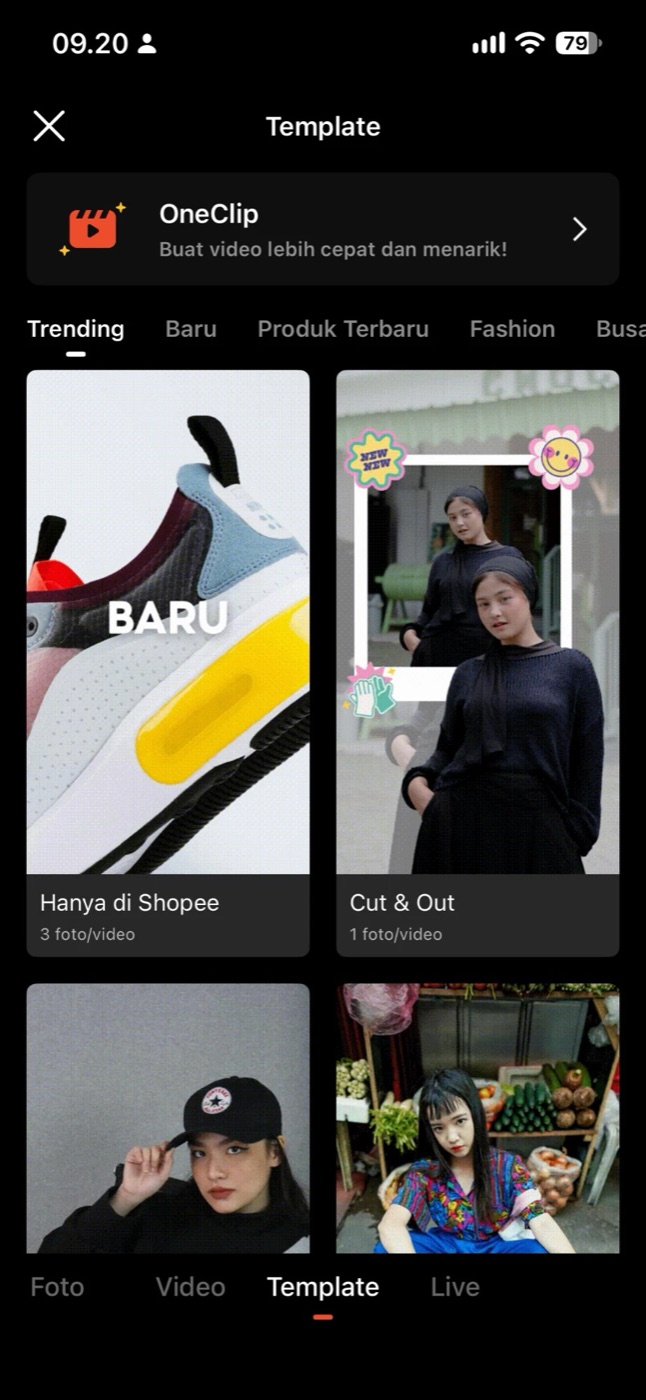
A template exists to make content creation easier for sellers. They shoot a photo or video of their product, pick a template, and a few clicks later the video is finished and ready to post in Shopee Video. No editing skills and no blank timeline.
- 01
Open the camera
Switch to the Template tab next to Photo, Video and Live.
- 02
Pick a template
Browse the library by tab. Each cover says how many photos or videos it needs.
- 03
Add media
Choose the photos or clips, here three videos of a product.
- 04
Preview
See the template filled with your own footage and tap a clip to swap it.
- 05
Caption and attach a product
Write a caption, add a product and voucher, then post.
- 06
Live in the feed
The finished video appears in Shopee Video, template and all.
Role
My role and the team
I was a designer on the SDK, designing templates alongside the other designers. Each of them focused on their own region. For Malaysia I was the one who collaborated with the region and kept its design direction and its part of the SDK toolkit in order.
Day to day I worked with the Malaysian marketing team and the PM.
The regional team are locals and know the market better than I do. They often had their own perspective and feedback, and when they did, I followed it.
The turn
A slow start, then a spike
For the first three weeks the weekly refresh moved very little. By month two usage had reached 7K a week, and by the end of month three it was 34K.
Here is what we did, in order:
Weeks 1–3
A slow start. Weekly refreshes, little change in usage.
Month 2
Adoption picks up and reaches 7K weekly uses.
Month 3
Usage climbs to 34K weekly uses by the end of the month.
- 01
Reuse what worked in Indonesia
Templates had gone out in Indonesia before Malaysia. Many of them already filled the gap, so I started by bringing those over instead of waiting to design from scratch.
- 02
Research what Malaysia likes
I looked at what was trending locally through TikTok tools, TikTok top content, CapCut, competitors, and input from the regional team.
- 03
Design for Malaysia
Once we saw momentum and pickup, I started designing templates for Malaysian needs and preferences, in the direction the research pointed to.
Research
What Malaysia liked
Looking across TikTok tools, TikTok top content, CapCut and competitors, with input from the Malaysian marketing team, three things kept showing up:
Fast-paced music
Minimal elements
Rapid transitions
That is the direction I designed toward. The result was clearest in one template: an OOTD-themed one drove around 15K weekly uses by itself, and the rest followed with thousands each.
The work
Templates I designed
Three examples of templates I designed. They loop while on screen, and a tap pauses or plays.
Template 01
Six frames of happiness
A six-photo collage that fills a vertical frame, with hand-made stickers (a plaster, a star, a CD) laid over the seams.
- 6 photos
- Collage
- Stickers
Template 02
Bento grid
Photos land in a bento-style grid of rounded tiles, with a Shopee logo tile and a vertical hashtag tile built into the layout. It starts on a single photo and opens out into the full grid.
- Grid layout
- Brand tile
- Hashtag
Template 03
Shopee.exe
A retro desktop window: title bar, menu, Back and Next buttons and a row of thumbnails with film-style names. Stepping through changes the main photo and its colour grade.
- Retro UI
- Colour grades
- Interactive feel
What I learned
- Reuse before you create. Templates that already worked in Indonesia gave Malaysia a head start and showed us where the real gaps were.
- Read the market, then design. Fast music, minimal elements and rapid transitions were what people already enjoyed, so the templates followed that.
- Listen to the people who live there. The regional team are locals and know better than I do. When their view differed from mine, I followed it.
- Adoption needs a rhythm, not a launch. A weekly refresh keeps the library worth coming back to.
Tools & skills
Want to talk about this work?
I'm happy to go deeper on the decisions, the trade-offs or the numbers.
Next project
Localizing Shopee's AR effects for Indonesia